Photoshop Nut : Gavin Hoey
Showing posts with label video. Show all posts
Monday, 21 January 2013
Symmetry with Photoshop
Originally posted at TipSquirrel.com
Photoshop Nut : Gavin Hoey
As a photographer symmetry is one of the hardest types of composition you can find. Nature has a habit of avoiding symmetry most of the time. You’ll never walk through a forest and find two identical trees and you’ll never see the left side of the sky perfectly matching the right.
However it is dead easy to create symmetrical images using Photoshop, the knack is disguising the fact that you used Photoshop at all.
In this video I’ll show you how to mirror an image and then apply a few tweaks to complete the perfect symmetric photo.
Photoshop Nut : Gavin Hoey
Saturday, 5 January 2013
From The TipSquirrel.com Archive : Getting Started in HDR Pro
Originally posted at TipSquirrel.com
Photoshop Nut : Richard Harrington
In this exclusive video for TipSquirrel.com Rich Harrington show’s us how to get our images into HDR Pro and what to do with them once they’re there!
Photoshop Nut : Richard Harrington
Tuesday, 18 December 2012
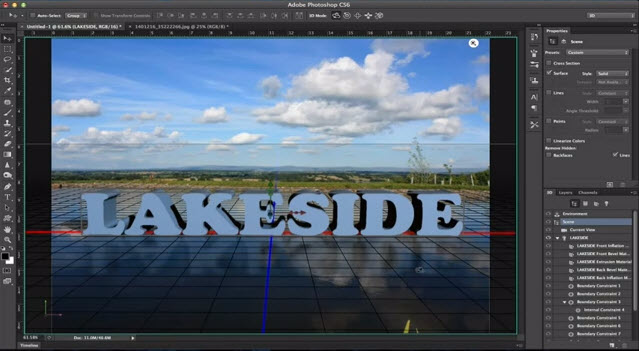
The 3D Ground Plane in Photoshop CS6 Extended
Photoshop Nut : Mike Hoffman
When the 3D Ground Plane first made its appearance in Photoshop CS5 Extended, it was slightly useful, a little bit tricky, and very much hidden from view. With CS6, Adobe brings us a more useful design element - one that catches shadows, and casts reflections - and all in real time while you edit. This makes it an interactive tool that is both easy to use and effective in bringing added realism to your composites.
Subscribe to:
Posts (Atom)